01Meet DeviceLink
Backups for the code that runs a factory
DeviceLink backs up the code on factory machines. Every site needed its own agent: a small app on a machine in that building.
Copia started as Git for industrial automation code. Then it grew into backups: DeviceLink pulls the code off PLCs on the floor and keeps every version.
No one else backed up this many PLC vendors automatically, so DeviceLink was the big bet. The model was simple: an organization has sites, and sites have devices. To back up a site, customers installed an agent, a small app on a machine in that facility. The agent talks to the PLCs on one side and to Copia on the other, and uses each vendor's own software to read their files.
Before: one agent per site, and each agent could only see its own site.
Copia's team of technical support engineers (TSEs) set agents up with each customer's controls engineers. Being on-prem had a real upside: the agent lived inside the customer's walls, under their control.
02The cost of one site
Five problems, one root
The more I learned, the more the same root kept showing up: the agent was tied to a building.
Agents went offline
The laptop died, went to sleep, or someone shut it down. Backups quietly stopped.
Licenses stacked up
Each agent needed the vendor software for every device it backed up, paid monthly. Across many sites, that added up fast.
Idle agents still cost
A site with three devices still needed a whole agent: its own machine, and its own copy of every vendor license.
One backup at a time
An agent runs one job at a time, so each site had a ceiling on how much it could back up in a day.
A machine, always on
Every site had to keep a computer running just for the agent.
Sites change over time
While a site is being commissioned, it may need backups several times a day. Once it's running, far fewer. One fixed agent per site was either swamped or idle.
03Listening first
"Why can't the agent live in the cloud?"
New to the industry, I asked a lot of questions, and kept asking “why not?” about agents tied to one site.
I came to Copia without an industrial background, so in onboarding I asked a lot of questions. Engineers are always happy to share an idea or an "I wish".
- Engineersand engineering managers
- Sales & CSdeals and escalations
- Supporttickets and TSEs
- Recordingsendless customer calls
The idea of agents that weren't tied to a site was already floating around in those conversations. It wasn't mine alone. What I did was keep asking "why not?" until someone had to answer.
The architecture was built around one agent per site, so this meant real engineering change. And no customer was asking for anything this radical. But under the "no" there was curiosity, and that was enough to keep going.
04Building the case
From a hallway question to the roadmap
My PM and I took the question to engineering, finance and brand, until it made the roadmap.
Over the next few months, my PM and I took the question to anyone who could tell us what would break.
He brought it to the engineering managers. Together we pulled in finance and brand, to weigh the pros and cons at the idea stage: not only what it would take to build, but what it would do to the business.
- OnboardingAsk everyone everything
- Months 1–3"Why not?" in hallways and 1:1s
- With my PMEngineering, finance, brand
- Turning pointOne cross-functional review
- ShippedMulti-site agents, Dec 2024
A meeting where business, money, UX and engineering looked at the idea together. Once everyone could see the whole picture at once, it went on the roadmap, and I led the design.
05The pricing debate
Fewer agents, and still a better business
If customers could share agents, would they buy fewer? I started those conversations, and my questions helped the team make the call.
The hardest conversation wasn't about pixels. It was about money: if customers could share agents across sites, would they buy fewer of them?
At least one agent per site. Every agent needs a license for every vendor at its site, so the same license is paid for again and again.
Pay for the agents you actually run. Give one agent Siemens, another Rockwell, another CODESYS, and each license is paid for once.
I started those conversations and kept them going, with questions like:
- Would this cause problems with what current customers already pay?
- If it cuts their vendor license burden, what does Copia actually lose?
The final call was a team decision. I'm proud my questions helped us get there: an agent that fits the way a customer's sites actually work makes Copia easier to say yes to, and easier to grow with.
Who it worked for
Fewer agents than sites
A handful of sites with a few devices each no longer need an agent apiece.
Agents follow the load
One plant with hundreds of devices, three with a dozen: agents go where the work is, not where the walls are.
One agent per vendor
Agents organized by vendor, each carrying one license, with permissions set up around those agents.
Room for commissioning
Lend capacity to a site while it's being built, and take it back once it's running.
06Designing the details
Small surfaces, big questions
On screen the change looks small: one dropdown, a globe icon, and permissions that never overshare.
On screen, the change looks small. Underneath it are questions about trust, privacy and control.
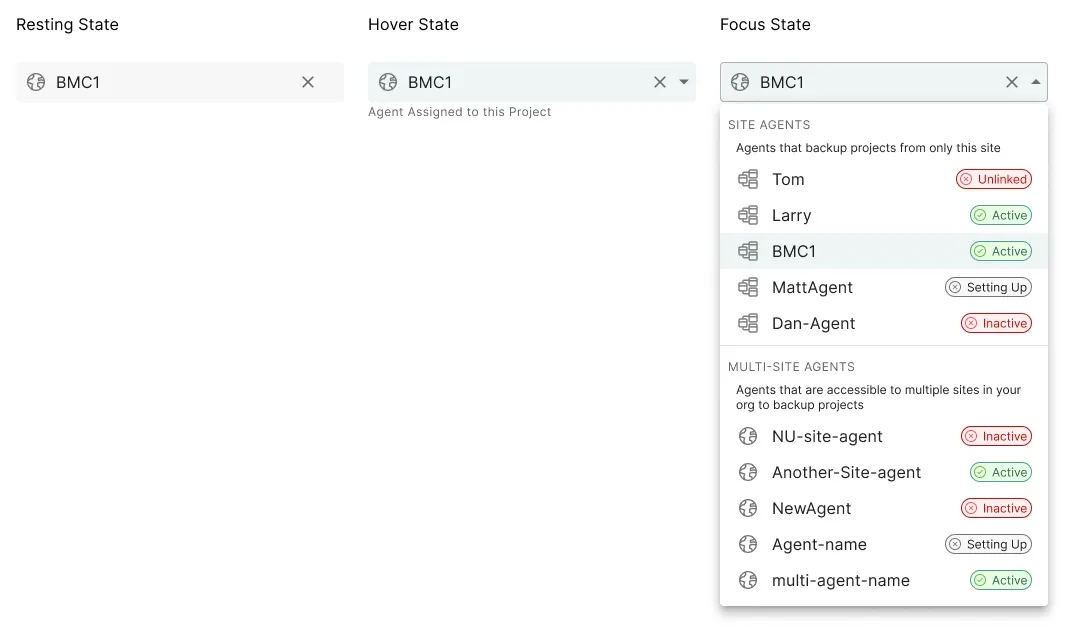
Choosing an agent
Every project gets an agent dropdown that lists the site's own agents and the organization's multi-site agents together. Each one shows its type and a status chip: setting up, active, inactive or offline. So you never pick an agent that can't run. The project editor needed a new spot for it.
A globe for "many sites"
I kept it simple: site agents keep the icon people already knew, and multi-site agents get a globe. One new symbol to learn, not a new system.
Sharing without oversharing
A multi-site agent can back up sites that some users aren't allowed to see. Those users see only how busy the agent is, as a percentage, never which other sites or projects it's working on. Enough to choose well, without leaking anything.
Who's in charge
No new roles. Owners create multi-site agents in organization settings, and anyone with write permission on a project can change its agent. That matches how teams already worked.
A choice, not a migration
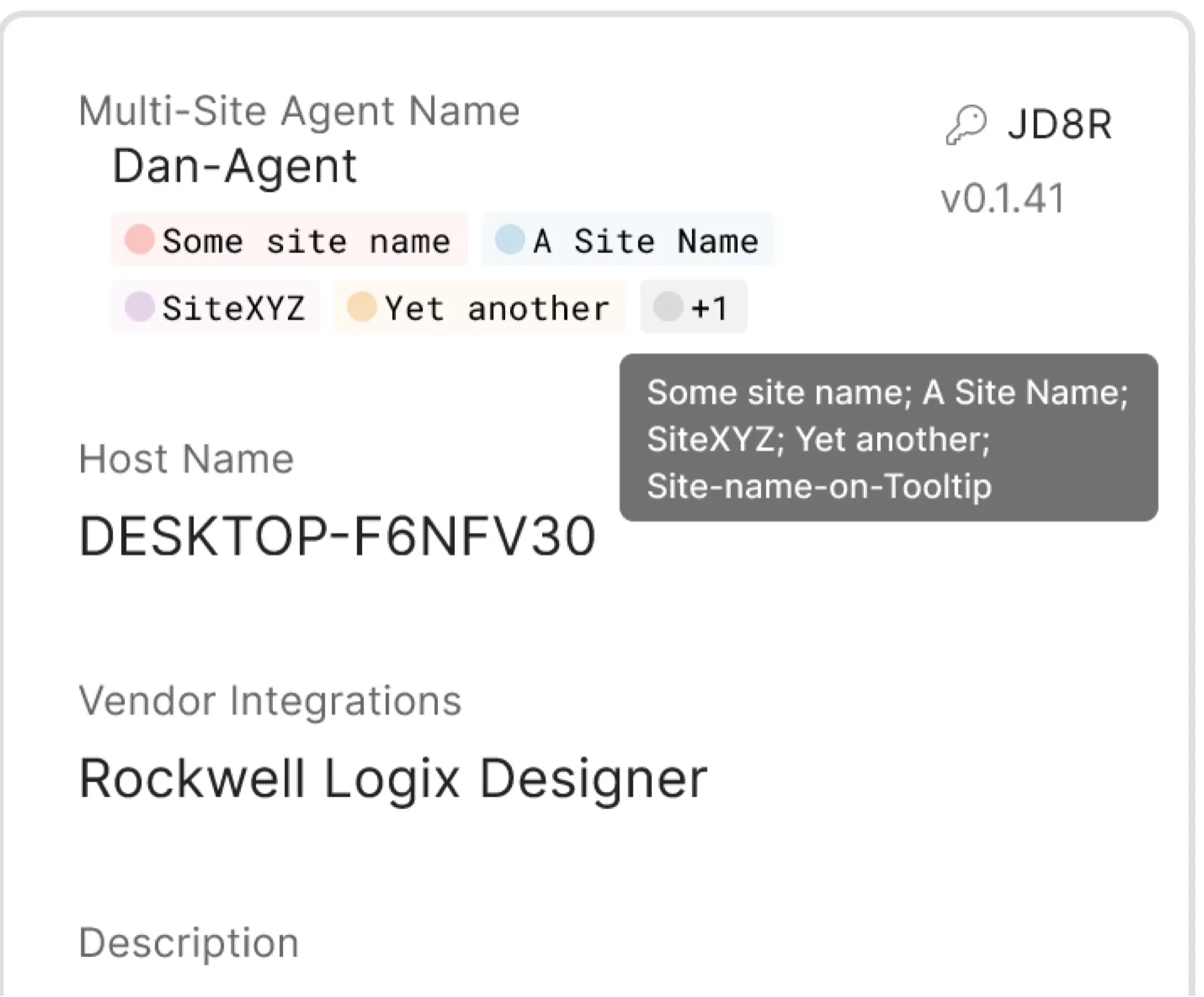
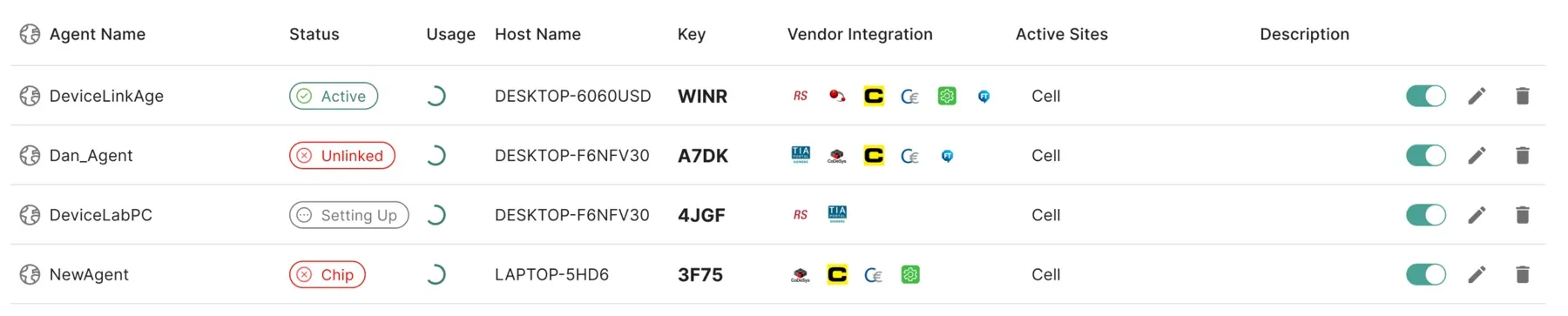
Site agents stayed. Customers who want everything on-prem keep that control. Moving is project by project: set up a new agent, then switch projects to it. The agents table was designed to grow into bulk changes.
See the multi-site agent card and the agents table
07Try it yourself
Share the agents
A made-up company with four sites. Switch the agent type, move a site from commissioning to operating, and see the agents through a plant engineer's eyes.
A playful sketch, not the real product or Copia's pricing. Sites, vendors and numbers are made up.
08What changed
Customers used it in ways we hoped, and some we didn't plan
- Projects moved over. Many existing customers moved projects to multi-site agents to cut vendor licenses and keep agents busy.
- Accounts grew. Several existing customers expanded their use of Copia.
- New customers said yes. Teams who had held back because all those per-site costs added up signed on.
- New setups appeared. Large customers organized agents by vendor and set permissions around them.
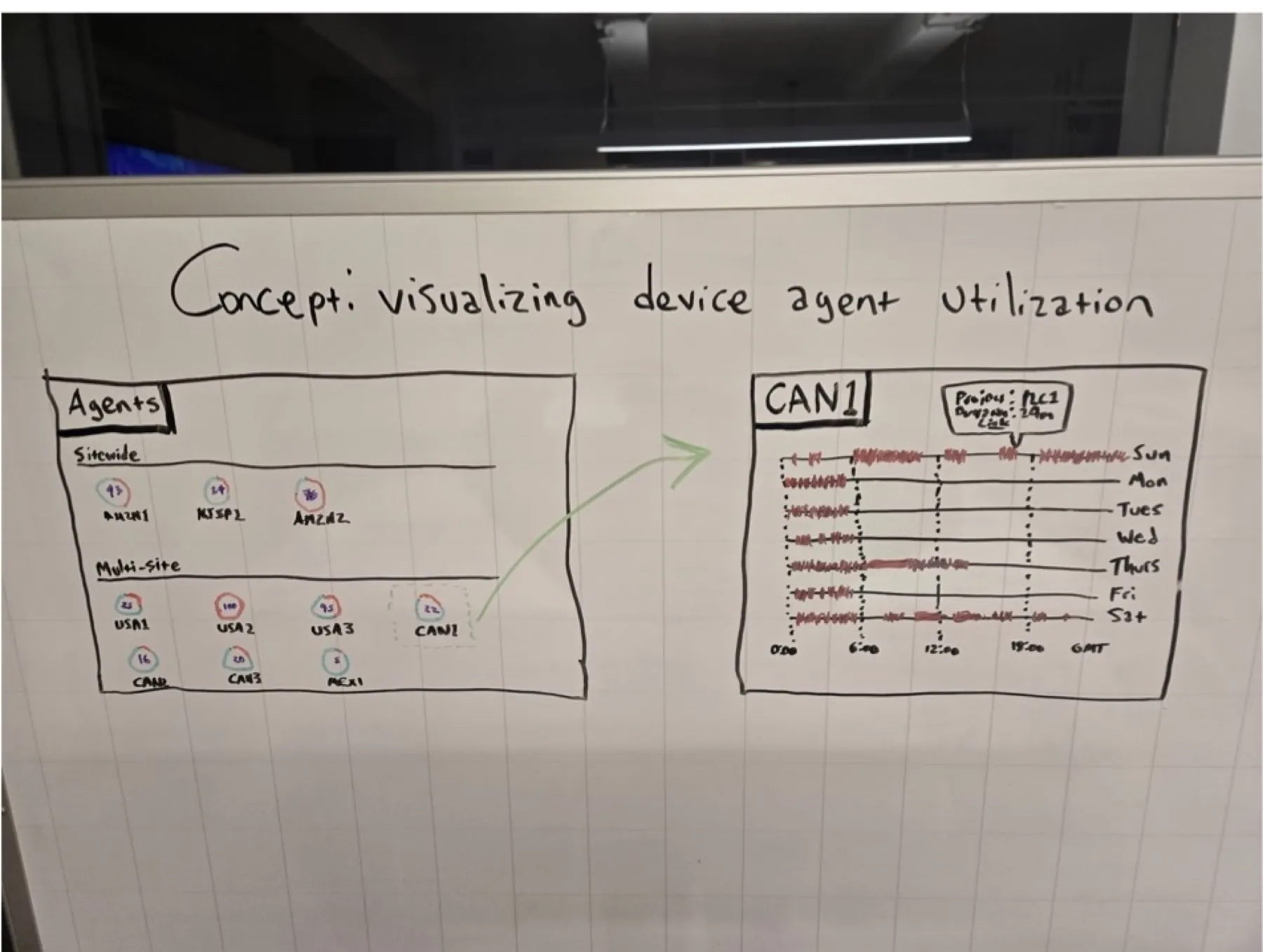
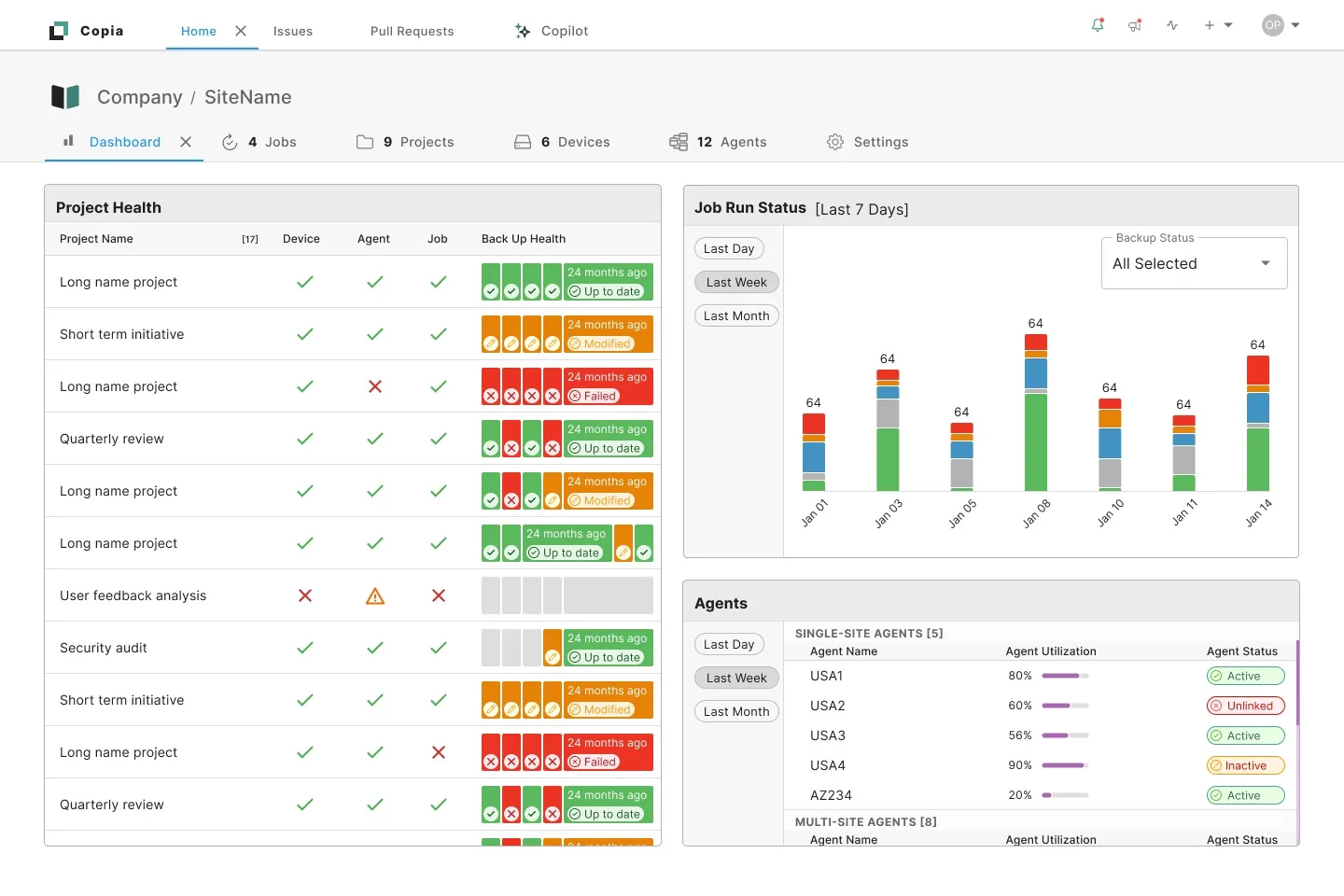
A few months later, we built dashboards that show agent use and status at a glance, the first step toward the agents page below.
09The north star
An agent's day, at a glance
Where I'd like agents to go: a page that shows each agent's day, like a playlist, a calendar or a timeline.
You'd see which sites and projects an agent backs up, when, and what failed. Then patterns would jump out: a vendor license that expired, or a bug breaking every backup for one vendor.
Offline backups belong here too, something the industry keeps asking for: a site agent could keep backups on its own machine while offline, and sync them when it's back.